aXGate brings familiar gating and downward expansion to Ambisonics, with a spatial side-chain that lets you choose which part of the scene drives the processing.
Use gating or downward expansion to reduce low-level material while keeping your Ambisonic scene spatially coherent.
Choose what drives it
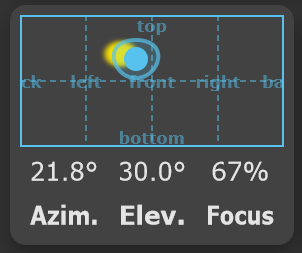
Point a virtual microphone into the sound field and use the signal from that direction to drive the gate or expander.
See the gain reduction
Follow the amount of gain reduction over time and adjust the display range to suit the material you are working on.
A gate that understands space
Let the right part of the scene open the gate.
A conventional gate listens to its input level. aXGate can listen through a virtual directional microphone instead, giving you control over which part of your Ambisonic scene drives the detector.
Aim the microphone with azimuth and elevation, then adjust its focus to change how directional the detector becomes.
Use the controls you already know from conventional gates, then add spatial control over the signal that determines when the processing responds.
01 / Spatial side-chain
Point the detector where it matters.
Point a virtual microphone anywhere in the sound field and use the signal it picks up to drive the gate or downward expander.
Set the microphone’s azimuth and elevation, then adjust its focus to control how directional the detector becomes.
02 / Gate & downward expansion
From clean gating to gentler control.
Use aXGate as a conventional noise gate or adjust the ratio for downward expansion when you want lower-level material reduced rather than simply cut away.
Threshold, ratio, knee, attack and release give you control over how strongly and how smoothly the processing responds.
03 / Gain reduction display
See when the gate is working.
Follow the amount of gain reduction applied over time, making it easier to see how the gate or expander is responding to your material.
Right-click the display to change its range when you want a different scale for subtle or stronger processing.
The full control set
Fine control over what stays and what goes.
Input gain
Boost or cut the signal level before it reaches the gate and detector.
Output make-up gain
Adjust the final output level to compensate for overall level reduction.
Threshold
Set the detector level below which the gate or downward expander begins to reduce the signal.
Ratio
Control how strongly the signal is reduced when the gate or expander is active.
Knee width
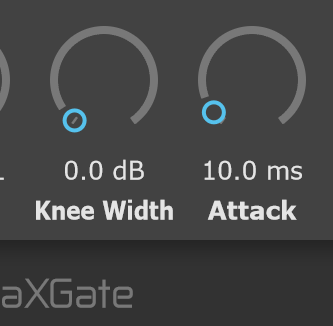
Control how gradually the processing transitions around the threshold. A zero-width knee gives a harder transition.
Attack
Control how quickly the gate or expander responds as the detector crosses the threshold.
Release
Control how quickly the processing returns as the detector moves back across the threshold.
RMS / peak detection
Choose whether the detector responds to peak signal level or a smoother RMS measure of the signal.
Azimuth & elevation
Point the virtual side-chain microphone toward the direction you want to drive the detector.
Focus
Adjust the directivity of the virtual microphone for broader or more directional side-chain detection.
Ambisonics in, Ambisonics out
Reduce the noise. Keep the scene connected.
aXGate applies gating or downward expansion while preserving the spatial relationship between the sounds in your immersive scene.
Your Ambisonic format stays intact.
Use an Ambisonic input with the W channel on the first input. The processed output retains the same Ambisonic channel format for the next stage of your workflow.
Plan for your channel count.
First order uses 4 channels, third order uses 16, and tenth order uses 121. Your DAW must support the required track width and plugin routing.
a1 handles first order; a3 handles up to third order; aX handles up to tenth order. Test the trial in your intended DAW and session before purchasing.
Find your fit
Choose your version.
The same spatial gate and downward expander, with the Ambisonic order range your work needs.
* Maximum order depends on your DAW.
Formats & requirements
Check the fit for your studio.
Your host needs internal routing that supports the required number of Ambisonic channels. Check your DAW’s current channel limits and test aXGate in your intended session before purchasing.
Intel or Apple Silicon (Universal Binary) macOS 10.13 or later · 4 GB RAM
Windows
64-bit Windows 10 or later 4 GB RAM
Processing
Noise gate and downward expansion
Input & output
Ambisonic input with W on the first channel Output retains the input channel format
Spatial side-chain
Azimuth · Elevation · Focus
Ambisonic versions
a1: first order (4 channels) a3: up to third order (16 channels) aX: up to tenth order (121 channels)
Host routing
Track width and plugin routing must support the chosen Ambisonic order.
A little more detail
Good questions.
Is aXGate a gate or a downward expander?
It can be used for both. Adjust the dynamics settings to move from stronger gating to gentler downward expansion of low-level material.
How is aXGate different from a conventional noise gate?
aXGate is designed to process Ambisonic signals while preserving their spatial relationships. It also adds a spatial side-chain, allowing a virtual directional microphone to determine what drives the detector.
Does the spatial side-chain only process sound in the selected direction?
No. The virtual microphone controls the detector that drives the gate or expander. Its direction determines what the detector listens to; it does not simply isolate and process only that direction.
Can I see how much gain reduction is being applied?
Yes. The gain-reduction display shows the amount of reduction over time, and you can right-click it to select a different display range.
Can I choose peak or RMS detection?
Yes. aXGate can use either peak or RMS signal level to drive its detector.
Which Ambisonic order do I need?
Match the version to your source material and the channel count supported by your DAW. a1 handles first order, a3 handles up to third order, and aX handles up to tenth order in compatible hosts.
Can I try the plugins first?
Yes. Download a trial from SSA Plugins and explore the full functionality for 15 days in your own workflow.
Can I upgrade to a higher order later?
SSA Plugins offers an upgrade policy. Contact SSA Plugins through the current store for your upgrade options and voucher.
Clean up your own sound field.
Explore spatial gating and downward expansion with a 15-day free trial of aXGate.