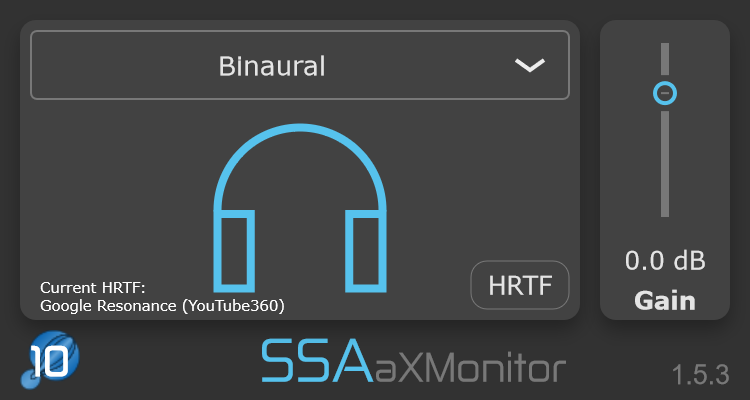
aXMonitor turns your Ambisonic scene into binaural for immersive headphone monitoring, with stereo decoding when you need a conventional two-channel output.
Decode your Ambisonic production for immersive listening over ordinary headphones.
Personalise your HRTF
Load HRTFs in the SOFA format to tailor binaural rendering to your own listening experience.
Take it back to stereo
Decode first-order Ambisonics to conventional stereo or UHJ Super Stereo when a two-channel output is what you need.
The other half of Ambisonics
Build in Ambisonics. Listen in the real world.
Ambisonics describes a sound field. aXMonitor converts that sound field into something you can actually hear, whether you are monitoring immersively on headphones or creating a stereo output.
Binaural decoding supports Ambisonic signals up to tenth order with aXMonitor aX, while the plugin automatically adapts its processing to the order of the signal you feed it.
From personalised headphone rendering to two-channel playback, aXMonitor gives you several ways to translate an Ambisonic sound field into a listening format.
01 / Binaural monitoring
Step inside your mix.
Decode your Ambisonic scene to binaural and monitor its direction and spatial character through headphones.
The built-in binaural rendering uses HRTFs generated from Google’s Resonance Audio data, giving you a ready-to-use monitoring path without additional setup.
02 / Custom HRTFs
Make the rendering more personal.
Load your own HRTFs using the SOFA file format and use them for binaural decoding instead of the built-in set.
Because our ears and heads are different, personalised HRTFs can give you a binaural presentation better matched to the way you localise sound.
03 / Stereo decoding
Bring the scene back to two channels.
Convert first-order Ambisonics to UHJ Super Stereo or use cardioid stereo decoding for conventional left and right loudspeaker playback.
UHJ can be processed using either FIR or IIR filters and can create a spacious presentation that extends beyond a conventional stereo image.
04 / Automatic order detection
Let the plugin match the signal.
aXMonitor automatically matches its processing to the Ambisonic order of the incoming signal, so there is no need to select the input order manually.
Lower-order material therefore uses only the processing it needs, helping to avoid unnecessary CPU use.
Monitoring options
One sound field. Several ways to hear it.
Binaural output
Decode the Ambisonic sound field to a two-channel binaural signal for immersive headphone listening.
Custom HRTF
Load HRTF data from a compatible SOFA file for personalised binaural rendering.
UHJ Super Stereo
Decode first-order Ambisonics to a spacious two-channel UHJ signal for stereo playback.
FIR or IIR UHJ
Choose between FIR and IIR implementations when using the UHJ stereo decoder.
Cardioid stereo
Decode first-order Ambisonics using virtual left- and right-facing cardioid microphones for conventional stereo playback.
Output gain
Adjust the final listening level at the output of the plugin.
Ambisonics in. Listening formats out.
The final step in the signal chain.
aXMonitor sits at the monitoring or output end of your Ambisonic workflow, translating the encoded sound field into binaural or stereo.
Decode for the way you need to listen.
Input uses AmbiX (ACN/SN3D) Ambisonics. Binaural decoding supports the maximum Ambisonic order available in your version, while first-order signals can also be decoded to UHJ or cardioid stereo.
Match the plugin to your session.
First order uses 4 input channels, third order uses 16, and tenth order uses 121. Your DAW must support the track width and plugin routing required by the Ambisonic order you are monitoring.
a1 handles first order; a3 handles up to third order; aX handles up to tenth order for binaural decoding. Test the trial in your intended DAW and session before purchasing.
Find your fit
Choose your version.
The same monitoring workflow, with the Ambisonic order range your work needs.
* Maximum order depends on your DAW.
Formats & requirements
Check the fit for your studio.
Your host needs internal routing that supports the required number of Ambisonic channels. Check your DAW’s current channel limits and test aXMonitor in your intended session before purchasing.
Intel or Apple Silicon (Universal Binary) macOS 10.13 or later · 4 GB RAM
Windows
64-bit Windows 10 or later 4 GB RAM
Sample rates
44.1 · 48 · 88.2 · 96 · 192 kHz
Input
AmbiX (ACN/SN3D) Ambisonics
Output
Binaural UHJ Super Stereo (first order) Cardioid stereo (first order)
Ambisonic versions
a1: first order (4 channels) a3: up to third order (16 channels) aX: up to tenth order (121 channels)
Custom HRTF
SOFA file support
Host routing
Track width and plugin routing must support the chosen Ambisonic order.
A little more detail
Good questions.
Do I need aXMonitor to hear Ambisonics?
You need an Ambisonic decoder of some kind. Ambisonic signals are an encoded representation of a sound field and are not intended to be listened to directly. aXMonitor provides binaural decoding for headphones and stereo decoding for first-order material.
Can I use my own HRTFs?
Yes. aXMonitor supports HRTFs stored in the SOFA format, allowing you to replace the built-in binaural HRTFs with a compatible custom set.
Can I monitor over normal stereo speakers?
Yes, with first-order Ambisonics. aXMonitor provides both UHJ Super Stereo and cardioid stereo decoding for two-channel loudspeaker playback.
Do I need to set the Ambisonic order manually?
No. aXMonitor automatically detects and matches its processing to the order of the incoming Ambisonic signal, helping it use only the processing required for that signal.
Which Ambisonic order do I need?
Match the version to your source material and the channel count supported by your DAW. a1 handles first order, a3 handles up to third order, and aX handles up to tenth order for binaural decoding in compatible hosts.
Can I try the plugins first?
Yes. Download a trial from SSA Plugins and explore the full functionality for 15 days in your own workflow.
Can I upgrade to a higher order later?
SSA Plugins offers an upgrade policy. Contact SSA Plugins through the current store for your upgrade options and voucher.
Hear your own sound field.
Explore binaural and stereo monitoring with a 15-day free trial of aXMonitor.