Ambisonic metering

Every channel.
One clear view.

aXMeter gives you clear peak and RMS metering across Ambisonic signals up to tenth order. All 121 channels when you need them.

Free   /   VST3 & AAX   /   Mac & Windows

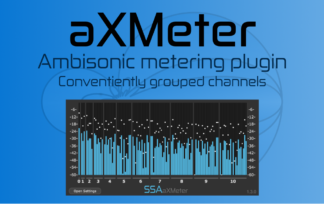
aXMeter displaying tenth-order Ambisonic channel levels

aXMETERSEE THE LEVELS. KEEP THE SIGNAL.

Keep an eye on the whole field

Wide signals.
Without the clutter.

See every channel

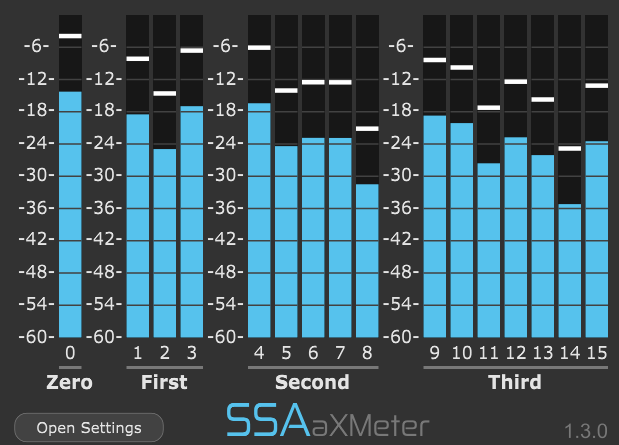
Follow peak and RMS levels across your Ambisonic signal, with channels grouped by order for quick inspection.

Use only the space you need

The interface expands for higher-order signals and shrinks again when you return to lower orders.

Leave the audio untouched

Drop aXMeter into your multichannel signal path for visual feedback while the audio passes through unprocessed.

aXMeter showing a third-order Ambisonic signal

Made for multichannel work

Meter 121 channels without getting lost.

Higher-order Ambisonics quickly grows from a handful of channels to dozens and ultimately reaches 121 channels at tenth order. aXMeter keeps them organised by Ambisonic order so you can see where levels are changing.

Use the full display when you want detail or switch to Compact View for an at-a-glance picture that takes up less of your screen.

Add to basket (free)

A closer look

The information you need.
The space you don’t.

Choose how much detail you see and let the interface adapt as your Ambisonic order changes.

aXMeter peak and RMS display

01 / Meter display

See the levels your way.

Choose a combined peak and RMS display when you want both views of the signal, or simplify the interface to peak-only metering.

You can also choose between a green-yellow-red level gradient or a clean single-colour blue display.

aXMeter Compact View displaying high-order Ambisonics

02 / Compact View

Keep high orders under control.

When high-order signals fill the plugin with dozens of channels, Compact View condenses the display while keeping the channels grouped in a useful way.

It is designed for quick level checks when screen space matters more than large individual meters.

aXMeter interface adapting to different Ambisonic orders

03 / Automatic resizing

Let the interface follow the signal.

aXMeter automatically expands when you feed it higher-order Ambisonics and shrinks again for lower-order material.

By default, the interface shows channels through third order, so you are not left looking at rows of unused meters when working with smaller signals.

Display settings

Set the meter up for your workflow.

Peak + RMS

Display both RMS signal level and peak level on each channel meter.

Peak-only mode

Simplify the display when peak level is the information you need.

Meter colours

Choose a green-yellow-red gradient or a single blue meter style.

Compact View

Reduce the size of the meter display for convenient high-order monitoring.

Channel numbering

Choose standard Ambisonic Channel Numbering (ACN), beginning at 0, or ACN + 1, beginning at 1.

Dynamic range

Set the lower limit of the meter display from −6 dB down to −90 dB.

Peak decay

Control how quickly the peak indicator falls after a peak has passed.

Measure it. Don’t change it.

See the signal
without touching it.

aXMeter is designed to sit anywhere you need level information in a multichannel signal chain.

Any multichannel signal in. The same signal out.

aXMeter passes the incoming channels through unprocessed while displaying their levels, so you can insert it between stages of your Ambisonic workflow without changing the audio.

A useful place to put it.

Insert aXMeter after encoding with aXPanner to inspect your Ambisonic channel levels, then continue through your processing chain and decode with aXMonitor.

aXMeter supports Ambisonic signals through tenth order: 4 channels at first order, 16 at third order and 121 at tenth order.

No version to choose

aXMeter is free.

One plugin gives you metering for multichannel and Ambisonic signals up to tenth order.

aXMeter Ambisonic meter

Download aXMeter

Meter up to tenth-order Ambisonics with peak and RMS display, Compact View and automatic interface resizing.

Free

Add to basket

Formats & requirements

Check the fit
for your studio.

Your host must support the track width required by the multichannel or Ambisonic signal you want to meter.

PriceFree
Plugin formatsAAX and VST3
MacIntel or Apple Silicon (Universal Binary)
macOS 10.13 or later · 4 GB RAM
Windows64-bit Windows 10 or later
4 GB RAM
InputMultichannel audio
OutputSame channels as the input, passed through unprocessed
Ambisonic supportUp to tenth order (121 channels)
Host routingTrack width and plugin routing must support the number of channels being metered.

A little more detail

Good questions.

Does aXMeter process or change my audio?

No. aXMeter displays the signal levels and passes the incoming multichannel audio through unprocessed.

How many Ambisonic channels can it meter?

aXMeter supports Ambisonic signals up to tenth order, which contains 121 channels. Your DAW must also support a track width large enough for the signal you are using.

Can I use it with non-Ambisonic multichannel audio?

Yes. aXMeter accepts multichannel input and passes the same channels to its output. However, its channel grouping and automatic interface behaviour are designed specifically for Ambisonic signals.

Why does the plugin window change size?

aXMeter adapts its interface to the order of the incoming Ambisonic signal. Lower-order signals therefore do not leave you with large numbers of unused meters, while higher-order signals reveal the additional channels when they are needed.

What is Compact View for?

Compact View reduces the amount of screen space used by large high-order signals while retaining the channel grouping needed for quick visual checks.

See what’s happening across your sound field.

aXMeter is free. Add it to your Ambisonic toolkit and keep every channel in view.

Add to basket (free)