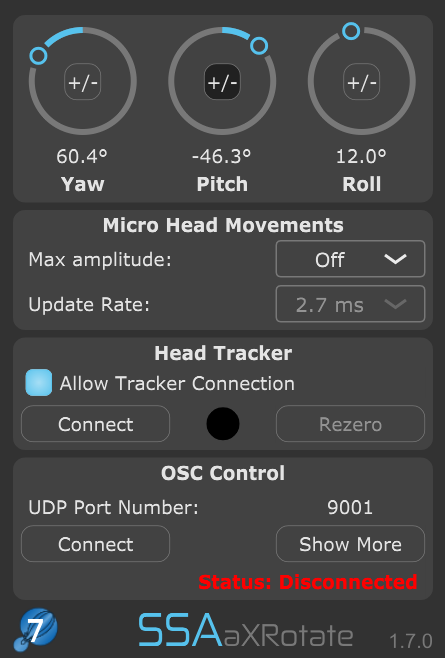
Control yaw, pitch and roll to turn the complete Ambisonic scene around the listener.
Follow the listener
Receive OSC data from a third-party head tracker and control scene orientation in real time.
Add subtle movement
Introduce small random scene rotations when no head tracker is connected to simulate natural micro head movements.
The advantage of a sound field
Rotate a complex scene like a single object.
An Ambisonic sound field can contain many individual sources, but you do not need to reposition them one by one. aXRotate turns the encoded scene as a whole.
Use it to align spatial audio with visual content, automate scene orientation or connect a head tracker for interactive listening.
Control rotation directly, drive it externally over OSC or add subtle automatic movement when the listening position is fixed.
01 / Scene orientation
Point the whole scene where it belongs.
Rotate your Ambisonic sound field using yaw, pitch and roll. Instead of moving individual sources, the complete spatial scene turns around the listener in one operation.
Each rotation axis can also be inverted independently, making it easier to match different coordinate conventions or external control systems.
02 / OSC head tracking
Let head movement control the scene.
Connect a compatible third-party head tracker that sends OSC messages and use its yaw, pitch and roll data to control aXRotate in real time.
Choose the OSC port used by the plugin and display incoming messages when you need to check or debug the connection.
03 / Micro head movements
Keep a static scene gently moving.
When you are not using a head tracker, aXRotate can add small random rotations that mimic the subtle involuntary movements we make even when trying to keep our heads still.
This small amount of movement can help with externalisation when listening to a static binaural rendering.
04 / Automatic order detection
Let the processing follow the signal.
aXRotate automatically matches its processing to the Ambisonic order of the incoming signal, so you do not need to set the order manually.
Lower-order signals therefore use only the processing required for their channel count.
The full control set
Control the orientation from every angle.
Yaw
Rotate the Ambisonic scene around its up/down axis.
Pitch
Rotate the scene around its left/right axis.
Roll
Rotate the scene around its front/back axis.
Rotation direction
Invert yaw, pitch or roll independently to match the direction required by your workflow or control source.
Micro head movements
Add small random rotations to the scene when working without a head tracker.
Update rate
Set how frequently head-tracking or micro-movement rotation is updated. More frequent updates give smoother rotation while requiring more processing.
OSC port
Choose the port used to receive OSC messages from an external head tracker.
OSC message display
View incoming OSC messages when setting up or debugging a head-tracking connection.
Ambisonics in, Ambisonics out
Change the orientation. Keep the sound field.
aXRotate changes the orientation of your Ambisonic scene while keeping it in AmbiX format for the next stage of your workflow.
Your Ambisonic format stays intact.
Input and output use AmbiX (ACN/SN3D) Ambisonics. The scene remains an Ambisonic signal after rotation, ready for further processing or decoding.
Plan for your channel count.
First order uses 4 channels, third order uses 16, and tenth order uses 121. Your DAW must support the required track width and plugin routing.
a1 handles first order; a3 handles up to third order; aX handles up to tenth order. Test the trial in your intended DAW and session before purchasing.
Find your fit
Choose your version.
The same scene-rotation and head-tracking tools, with the Ambisonic order range your work needs.
* Maximum order depends on your DAW.
Formats & requirements
Check the fit for your studio.
Your host needs internal routing that supports the required number of Ambisonic channels. Check your DAW’s current channel limits and test aXRotate in your intended session before purchasing.
Intel or Apple Silicon (Universal Binary) macOS 10.13 or later · 4 GB RAM
Windows
64-bit Windows 10 or later 4 GB RAM
Input
AmbiX (ACN/SN3D) Ambisonics
Output
AmbiX (ACN/SN3D) Ambisonics
Rotation
Yaw · Pitch · Roll
External control
OSC head-tracking input
Ambisonic versions
a1: first order (4 channels) a3: up to third order (16 channels) aX: up to tenth order (121 channels)
Host routing
Track width and plugin routing must support the chosen Ambisonic order.
A little more detail
Good questions.
Does aXRotate move every source in the scene?
Yes. It rotates the complete encoded Ambisonic sound field, so all of the sources within the scene change orientation together rather than being repositioned individually.
Can I connect a head tracker?
Yes. aXRotate can receive yaw, pitch and roll data over OSC from a compatible third-party head tracker for real-time scene rotation.
What are micro head movements?
They are small random scene rotations designed to mimic the subtle involuntary movements people make even when trying to hold their head still. They can be used when no live head tracker is connected.
Can I reverse the direction of a rotation axis?
Yes. Yaw, pitch and roll can each be inverted independently, which can help when matching different control or coordinate conventions.
Do I need to set the Ambisonic order manually?
No. aXRotate automatically matches its processing to the order of the incoming Ambisonic signal.
Which Ambisonic order do I need?
Match the version to your source material and the channel count supported by your DAW. a1 handles first order, a3 handles up to third order, and aX handles up to tenth order in compatible hosts.
Can I try the plugins first?
Yes. Download a trial from SSA Plugins and explore the full functionality for 15 days in your own workflow.
Can I upgrade to a higher order later?
SSA Plugins offers an upgrade policy. Contact SSA Plugins through the current store for your upgrade options and voucher.
Turn your sound field around.
Explore scene rotation, OSC head tracking and micro movements with a 15-day free trial of aXRotate.