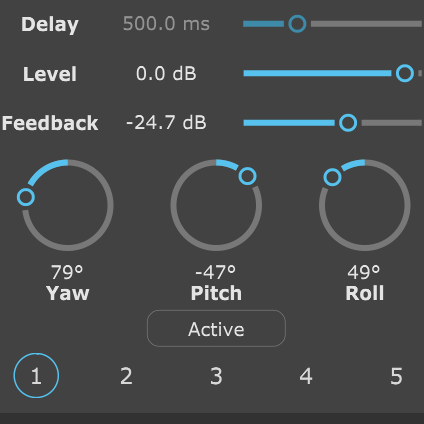
Move each delay independently around the Ambisonic sound field instead of leaving every echo at the original position.
Lock into the track
Set delay times manually or sync them to your DAW tempo for rhythmic repeats that stay connected to the music.
Go subtle or strange
Add a sense of depth and movement or build dense, disorienting patterns that travel around the listener.
Five delays. One sound field.
Turn repeats into spatial events.
Each of aXDelay’s five delay modules has its own delay time, gain, feedback and spatial rotation. A repeat can stay near the original sound, appear somewhere completely different or become one part of a pattern moving around the listener.
Work with Ambisonics from first order through to tenth order, while aXDelay automatically matches its processing to the order of the incoming signal.
Build the timing as you would with a conventional multi-tap delay, then use the sound field itself as another creative parameter.
01 / Spatial repeats
The echo doesn’t have to stay put.
Rotate each delayed signal independently relative to the original sound field. Place one repeat to the left, another behind the listener and another above — or keep them together when that serves the mix.
Yaw, pitch and roll give you three-dimensional control over the direction of each delay module.
02 / Timing & tempo sync
Make the repeats follow the music.
Set the timing of each delay independently and choose whether it runs freely or synchronises to your DAW tempo.
Combine different delay times across the five modules to create anything from closely spaced reflections to evolving rhythmic patterns.
03 / Gain & feedback
From one repeat to a trail of echoes.
Set the level of each delayed signal and control how much is fed back into the delay. Lower feedback values fade quickly; higher settings create longer repeating patterns.
Global dry and wet controls let you balance the original Ambisonic signal against the complete delay effect.
04 / Automatic order detection
Let the processing follow the signal.
aXDelay automatically matches its processing to the Ambisonic order of the incoming signal, so there is no need to select the input order manually.
Lower-order material therefore uses only the processing required for that signal.
The full control set
Five delays, each under your control.
Five delay modules
Build the effect from five individual delay taps, each with independent timing, level, feedback and spatial placement.
Delay time
Set the interval between the original signal and each individual echo.
Tempo sync
Synchronise individual delay times to the tempo of your DAW when you want rhythmically locked repeats.
Delay gain
Set the level of each delayed signal relative to the dry input.
Feedback gain
Control how strongly each delayed signal feeds back to create further repeats.
Yaw, pitch & roll
Rotate each delay in three dimensions so its echoes arrive from a different direction to the original signal.
Individual bypass
Switch individual delay modules in or out while building and auditioning the effect.
Dry & wet levels
Balance the original Ambisonic signal against the combined output of the five delay modules.
Ambisonics in, Ambisonics out
Transform the echoes. Keep the sound field.
aXDelay works directly with your Ambisonic scene, adding spatially controlled repeats while keeping the signal in AmbiX format.
Your Ambisonic format stays intact.
Input and output use AmbiX (ACN/SN3D) Ambisonics. The direct signal and delayed copies remain part of the same Ambisonic sound field.
Plan for your channel count.
First order uses 4 channels, third order uses 16, and tenth order uses 121. Your DAW must support the required track width and plugin routing.
a1 handles first order; a3 handles up to third order; aX handles up to tenth order. Test the trial in your intended DAW and session before purchasing.
Find your fit
Choose your version.
The same five-tap spatial delay, with the Ambisonic order range your work needs.
* Maximum order depends on your DAW.
Formats & requirements
Check the fit for your studio.
Your host needs internal routing that supports the required number of Ambisonic channels. Check your DAW’s current channel limits and test aXDelay in your intended session before purchasing.
Intel or Apple Silicon (Universal Binary) macOS 10.13 or later · 4 GB RAM
Windows
64-bit Windows 10 or later 4 GB RAM
Input
AmbiX (ACN/SN3D) Ambisonics
Output
AmbiX (ACN/SN3D) Ambisonics
Delay modules
Five independent spatial delay taps
Ambisonic versions
a1: first order (4 channels) a3: up to third order (16 channels) aX: up to tenth order (121 channels)
Host routing
Track width and plugin routing must support the chosen Ambisonic order.
A little more detail
Good questions.
How many delay taps does aXDelay have?
aXDelay has five individual delay modules. Each has its own delay time, gain, feedback, spatial rotation and bypass control.
Can each echo come from a different direction?
Yes. Each delay module can be rotated independently using yaw, pitch and roll, allowing its delayed signal to arrive from a different direction relative to the original Ambisonic scene.
Can the delays sync to my DAW tempo?
Yes. Delay timing can be set manually or synchronised to your DAW tempo, so the individual taps can follow the rhythm of your project.
Do I need to set the Ambisonic order manually?
No. aXDelay automatically matches its processing to the order of the incoming Ambisonic signal.
Which Ambisonic order do I need?
Match the version to your source material and the channel count supported by your DAW. a1 handles first order, a3 handles up to third order, and aX handles up to tenth order in compatible hosts.
Can I try the plugins first?
Yes. Download a trial from SSA Plugins and explore the full functionality for 15 days in your own workflow.
Can I upgrade to a higher order later?
SSA Plugins offers an upgrade policy. Contact SSA Plugins through the current store for your upgrade options and voucher.
Send your echoes somewhere new.
Explore five-tap spatial delay with a 15-day free trial of aXDelay.