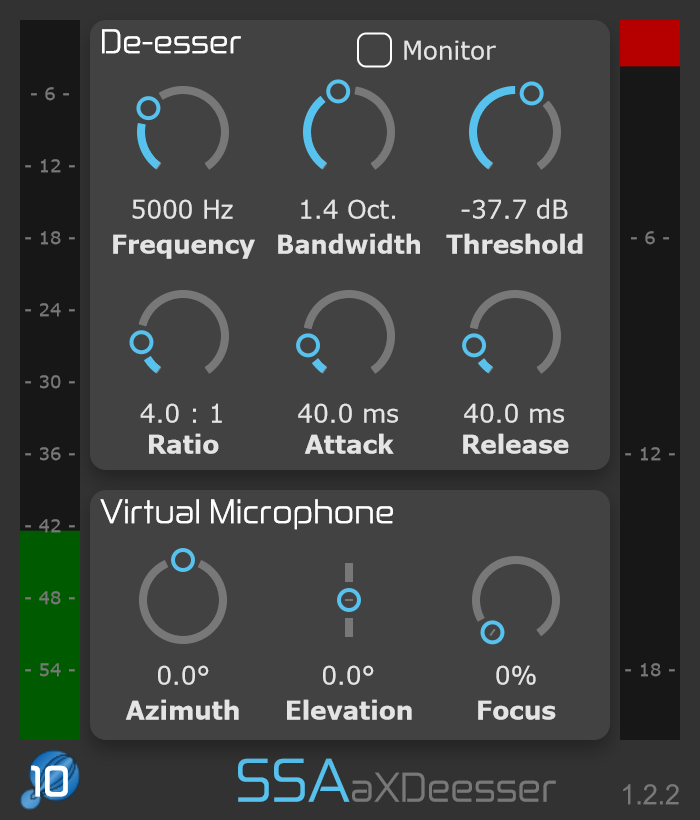
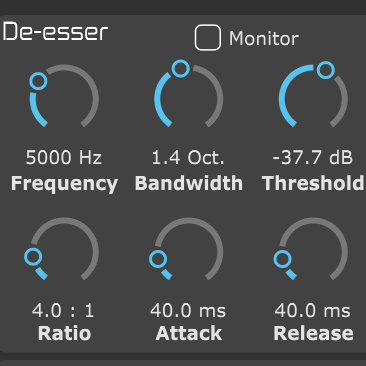
Set the frequency and bandwidth of the region you want to control, then dial in the amount of compression it needs.
Point the detector
Aim a virtual microphone at the part of the sound field you want to use to trigger the de-esser.
Keep the workflow familiar
Threshold, ratio, attack and release work just as you expect, with the spatial side-chain adding control over the detector.
A detector that understands direction
Let the right part of the scene trigger the processing.
Traditional de-essing responds to level in a chosen frequency range. aXDeesser adds another dimension: the detector can listen through a virtual directional microphone pointed into your Ambisonic scene.
Aim the microphone with azimuth and elevation, then adjust its focus to control how directional the side-chain becomes.
Separate control over the sibilance band, dynamics and spatial detector lets you tune the response to the material in your scene.
01 / Spatial side-chain
Point the detector where it matters.
Drive the de-esser from a virtual microphone pointed anywhere in the Ambisonic scene. Set its azimuth and elevation to choose the direction that controls when the processing responds.
Adjust the focus to change the virtual microphone’s directivity. The maximum available focus depends on the order of the incoming Ambisonic signal.
02 / Sibilance band
Focus the processing on the problem frequencies.
Set the centre frequency of the sibilance region, then adjust its bandwidth in octaves to define how much of the spectrum is included in the de-essing band.
Solo the sibilance band while setting it up so you can hear exactly which part of the spectrum is being targeted.
03 / Dynamics control
Take off as much edge as you need.
Set the threshold and ratio to control how strongly the sibilance band is compressed, then use attack and release to shape how quickly the processing responds and recovers.
The familiar compressor-style controls make it easy to move from subtle control to stronger reduction when the material needs it.
04 / Automatic order detection
Let the processing follow the signal.
aXDeesser automatically matches its processing to the Ambisonic order of the incoming signal, so there is no need to select the order manually.
Lower-order material therefore uses only the processing required for its channel count.
The full control set
Control the band, the compression and the detector.
Frequency
Set the centre frequency of the spectral region where you want to reduce sibilance.
Bandwidth
Set the width of the sibilance band in octaves.
Threshold
Choose the detector level at which compression of the defined sibilance band begins.
Ratio
Control how strongly the sibilance band is compressed when the detector rises above the threshold.
Attack
Set how quickly the compression reaches its full effect after the detector rises above threshold.
Release
Set how quickly compression stops after the detector falls back below the threshold.
Monitor sibilance band
Solo the selected frequency band while setting the detector and compression controls.
Azimuth
Choose the horizontal direction in which the virtual side-chain microphone points.
Elevation
Aim the virtual microphone above or below the horizontal plane.
Focus
Adjust the directivity of the virtual microphone used to drive the detector. Maximum focus depends on the input Ambisonic order.
Ambisonics in, Ambisonics out
Control the harshness. Keep the scene connected.
aXDeesser works directly on your Ambisonic signal and keeps the output in AmbiX format for the next stage of your immersive workflow.
Your Ambisonic format stays intact.
Input and output use AmbiX (ACN/SN3D) Ambisonics, so the processed scene can continue directly into further Ambisonic processing or decoding.
Plan for your channel count.
First order uses 4 channels, third order uses 16, and tenth order uses 121. Your DAW must support the required track width and plugin routing.
a1 handles first order; a3 handles up to third order; aX handles up to tenth order. Test the trial in your intended DAW and session before purchasing.
Find your fit
Choose your version.
The same spatial de-essing controls, with the Ambisonic order range your work needs.
* Maximum order depends on your DAW.
Formats & requirements
Check the fit for your studio.
Your host needs internal routing that supports the required number of Ambisonic channels. Check your DAW’s current channel limits and test aXDeesser in your intended session before purchasing.
Intel or Apple Silicon (Universal Binary) macOS 10.13 or later · 4 GB RAM
Windows
64-bit Windows 10 or later 4 GB RAM
Input
AmbiX (ACN/SN3D) Ambisonics
Output
AmbiX (ACN/SN3D) Ambisonics
Spatial side-chain
Azimuth · Elevation · Focus
Ambisonic versions
a1: first order (4 channels) a3: up to third order (16 channels) aX: up to tenth order (121 channels)
Host routing
Track width and plugin routing must support the chosen Ambisonic order.
A little more detail
Good questions.
How is aXDeesser different from a conventional de-esser?
Alongside conventional frequency, bandwidth and dynamics controls, aXDeesser uses a virtual directional microphone as its detector. You can point that side-chain toward a chosen part of the Ambisonic scene.
Does the virtual microphone determine when de-essing is activated?
Yes. The signal picked up by the virtual microphone drives the detector, so compression is activated when that detector signal rises above the threshold.
Can I hear the sibilance band on its own?
Yes. The sibilance-band monitor lets you solo the selected spectral region while you set its frequency, bandwidth and compression.
What does the Focus control do?
Focus changes the directivity of the virtual side-chain microphone. Its maximum available focus depends on the Ambisonic order of the incoming signal.
Do I need to set the Ambisonic order manually?
No. aXDeesser automatically matches its processing to the order of the incoming Ambisonic signal.
Which Ambisonic order do I need?
Match the version to your source material and the channel count supported by your DAW. a1 handles first order, a3 handles up to third order, and aX handles up to tenth order in compatible hosts.
Can I try the plugins first?
Yes. Download a trial from SSA Plugins and explore the full functionality for 15 days in your own workflow.
Can I upgrade to a higher order later?
SSA Plugins offers an upgrade policy. Contact SSA Plugins through the current store for your upgrade options and voucher.
Take the edge off your sound field.
Explore directional Ambisonic de-essing with a 15-day free trial of aXDeesser.